
MyCare Journey
-
-
Your content is sent twice a week — every Tuesday and Friday.
-
It comes by email or text. We strongly encourage email, since it gives you the best experience throughout your journey. If you haven't already, share your email address with your MyCare Coordinator on your next call.
-
To open a lesson from an email: first open the email, then just click or tap the link in your message that says “click here”.
-
To open a lesson from a text message: first open the text message and click the link in your message. The lesson will then open in your web browser.
-
-
-
Tuesday: a nutrition lesson paired with a fitness or motivational lesson. You’ll also see 2 quick check questions (multiple choice style) designed to help reinforce what you’ve learned. Along with suggestions for small habits to try that tie into the weekly topics.
-
Friday: a recap of the week’s lessons, a featured food with its health benefits, and an easy recipe that incorporates the week’s featured food. You’ll also see a real-life scenario style question you can try out, and we’ll check in on the weekly habit you set on Tuesday.
-
-
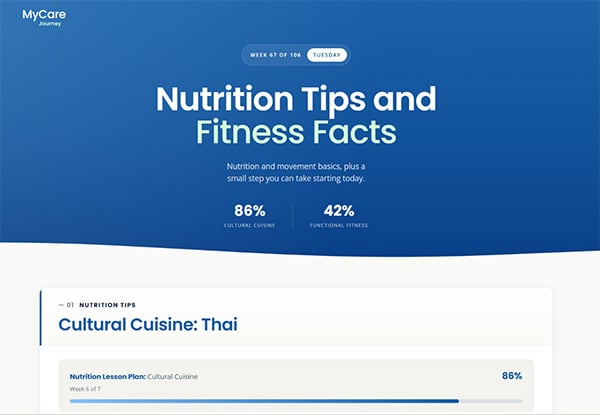
Since this is a journey, we want you to see how far you've come and what's still ahead. Your new MyCare Journey shows your total progress through the entire MyCare Journey, as well as your progress through the individual lesson plans within the curriculum.
-
Total MyCare Journey progress: found at the very top of your weekly lesson. Shown in the graphic where it says “Week 67 of 106.”
-
Total lesson plan progress: found in two spots:
-
Header: a quick glance at the bottom of the lesson header shows how far you are through the two lesson plans sent that week. In the graphic, this person is 86% through their Cultural Cuisine nutrition lesson and 42% through their Functional Fitness lesson.
-
Progress bars: at the top of each lesson block (nutrition and fitness or motivation), a progress bar shows visually how far you are through that week's lesson — including the percent completed and the number of weeks completed.
-
-
-
-
No. There's no app to install and no account to set up.
-
Everything opens with a single click or tap from your email or text — nothing to remember and nothing to sign in to.
-
-
- Yes! Just reopen the email or text we sent and click the link again — each one stays active.
- When you click the link, you’ll see the complete content for that lesson.
-
- As often as you like — there's no limit.
- Revisiting a lesson, quick check, or recipe is a great way to reinforce what you've learned.
-
- Quick checks and real-life scenarios are interactive — just tap the answer you think is right and you'll see a short, friendly explanation.
- If you get the answer wrong, that’s okay! You can always try again. There are no grades or scores; they're simply a fun way to make each lesson click.
- The weekly habit and habit check-in help you put what you've learned into practice and reflect on how things are going for the week.
-
- If you don't see an email, check your spam or junk folder.
- Make sure we have your correct email address or phone number — your MyCare Coordinator can confirm on your next call and make any updates if necessary.
- Still having trouble? Reach out to your MyCare Coordinator for assistance.
-
- Absolutely. Feel free to forward the email or text to a family member, friend, or caregiver.
- Going through the lessons together can make the journey more enjoyable and easier to stick with.